Table of Contents
- How to pronounce Monit
- Pid File
- Running Monit in a Container, e.g. Docker
- Execution Debug
- System Hardening
- Connection
- Connection Failed
- Running Monit from Init
- Running two or more Monit instances on the same machine
- Terminal: strange characters in the console
How to pronounce Monit
Keywords: pronounce Monit
Q: How do you pronounce Monit?
A: The name was originally meant as a pun on "Monitor It”, where it is a pronoun or IT for Information Technology. Later, someone suggested I’m on It which we like. The latter is also how we in the team pronounce Monit. Say: "I'm on it" fast, with a silent 'I'.
Pid file
Keywords: pid file
Q: If a program crashes without removing its pid file, will monit recognise that the program is not running?
A: Yes, Monit will always check that the pid number in a pid file belongs to a running process. If a program crashes and dies in a "normal" manner, then the process ID (pid) will not exist and monit will know that the program is not running and restart it even if a pid file exist. Some servers can crash and leave a zombie process, and appear to run. Monit also test for zombie processes and will raise an alert if a process has become a zombie.
Keywords: pid file
Q: I have a program that does not create its own pid file.
A: There are multiple options:
- You can use the check process <name> matching <pattern>, which doesn't require the pid file.
- If you prefer the pid file, create a wrapper script and have the script create a pid file before it starts the program.
Below you can find an example script for starting an imaginary program. Assuming that the script is saved in a file called /bin/xyz, you can call this script from monit by using the following in monitrc:
 check process xyz with pidfile /var/run/xyz.pid
       start = "/bin/xyz start"
       stop = "/bin/xyz stop"
The wrapper script for program:
 #!/bin/bash

 case $1 in
  start)
     /usr/bin/myprogram &
     echo $! > /var/run/xyz.pid ;
     ;;
   stop)
     kill `cat /var/run/xyz.pid` ;;
   *)
     echo "usage: xyz {start|stop}" ;;
 esac
 exit 0
Keywords: pid file
Q: Tomcat (The Jakarta Servlet Container) does not create a pid file and will put the server in the background.
A: Edit The catalina.sh script and find and remove the '&' character which will put the Tomcat server in the background. Then call tomcats startup.sh and shutdown.sh scripts from a wrapper script like the one mentioned above.
or
If your catalina.sh contains lines with $CATALINA_PID, you can just set CATALINA_PID=/path/file.pid environment variable.
Execution Debug
Keywords: Executing programs
Q: I'm having trouble getting monit to execute any "start" or "stop" or "exec" program commands. The log file says that they're being executed, and I can't find anything wrong when I run monit in verbose mode.
A:
You can debug a script or a program by calling it from bash and redirect output to a file which you can then inspect for errors. For instance to debug exec (the same can be done for start and stop commands):
if changed timestamp then exec "/bin/bash -c '/path/myscript &>/tmp/myscript.out'"
This will output the result of running /path/myscript to /tmp/myscript.out which you then can inspect for errors. The switch -c tell bash to execute the string that follows as a script. The statement, &>file is used to redirect any output from the script (stdout and stderr) to file. Note that there should be no space between & and >.
When debugging, it is recommended to run Monit in verbose mode so you can watch the console and see what Monit is doing. That is, invoke Monit using 'monit -Iv'. Once satisfied that the script works, you may want to remove the extra call to bash. In that case, the above would be
if changed timestamp then exec "/path/myscript'"
Finally, Monit uses the system call execv to execute a program or a script. This means that you cannot write shell commands directly in the start, stop or exec statements. To do this, you must do as above; start a shell and issue your commands there. For example:
start program = "/bin/bash -c 'my shell command && my other command'"
System hardening
Keywords: hardening capabilities
If you have a system with security policies and system hardening, this might cause problems running Monit if not done carefully. For instance, on Debian and Ubuntu, the Debian maintainer has set up default systemd hardening capabilities for the Monit service in /lib/systemd/system/monit.service which might block Monit from running some scripts. If you see inexplicable errors like:
  failed to start (exit status -1) – Program /some/path/script.sh failed: File '/some/path/script.sh' does not exist
  failed to start (exit status -1) – no output
You might want to investigate if you have (/usr)/lib/systemd/system/monit.service with hardening options enabled.
Running Monit in a Container
Keywords: Container, Docker
Store Monit's pid file in a tmpfs (see Docker docs). In case of a hard shutdown or a container crash, this will avoid a potential problem where an existing Monit pid file might cause Monit to think it has already started
docker start --tmpfs /run
or in a docker-compose.yaml (see Composer docs)
  tmpfs:
    - /run
This will simply create a tmpfs that is definitely empty when the container starts. You can specify where Monit should store its pid-file by using the -p switch to Monit at startup or use set pidfile in monitrc.
Connection
Keywords: Connection testing
Q: I have started monit with HTTP support, but when I telnet into the monit http port the connection closes.
A: If you use the host allow statement, monit will promptly close all connections from hosts it does not find in the host allow list. So make sure that you use the official name for your host or its IP address. If you have a firewall running also make sure that it does not block connections on the monit port.
Connection Failed
[I'm] hoping that this helps someone somewhere in the future. Skip the text and jump to the solution at the bottom if you are not interested in my adventure. I write this purely because googling for the error message did not show up with a single useful entry.
Since yesterday I received the message "connection failed, INET[www.example.com:80] via TCP is not ready for i|o -- Interrupted system call" every 5 minutes from a monit instance.
Sometimes it skipped the five minutes and came back after ten minutes or more (but always a multiple of five), sometimes it jumped one minute ahead and faulted after six minutes, to continue then again after five.
The server, however, *was* reachable and working (as it tested successfully from another server).
When I investigated further I discovered that the firewall did open all necessary connections, so it wasn't a fault there.
When I tcpdumped the traffic on the monit instance everything worked fine: Monit opens a TCP connection and the whole process of sending SYN, SYN/ACK, ACK, traffic and finally FIN, FIN/ACK etc. went smoothly.
However, every five minutes monit sent a SYNC, received a SYNC/ACK, but instead of acknowledging with an ACK the very next package was a RST.
Duh!
Replaying a configuration from the backup from the day before yesterday didn't help.
Finally I checked /var/log/messages (should have done that at first, but you know how it goes), where I discovered the wonderful "init: Id "mo" respawning too fast: disabled for 5 minutes".
Yes, I start monit from inittab.
Yesterday the switch where this server was connected to died. After reconnecting to another switch everything was fine again, but somehow the init process must have thought that monit was not running, tried to start it only to find out it was already running...
So the solution was very simple:
 SOLUTION:

 a) comment out the "mo:2345:respawn:/usr/bin/monit \-I" from /etc/inittab.
 b) restart the init process ("init q")
 c) stop monit ("monit quit")
 d) uncomment again the monit entry from inittab.
 e) Restart init again ("init q")
 d) watch your logfile. No more errors
Marcus
Running Monit from Init
Keywords: init
Q: How can I run monit from init so it can be respawned in case monit dies unexpectedly?
A: It is recommended that you use Monit version 5 or later when running Monit from init. Use either the 'set init' statement in monits configuration file or use the -I option from the command line. Here's a sample /etc/inittab entry for monit:
 # Run monit in standard runlevels
 mo:2345:respawn:/usr/local/sbin/monit -Ic /etc/monitrc
After you have modified inits configuration file, you can run the following command to re-examine the runlevel and start monit:
telinit q
If monit is used to monitor services that are also started at boot time (e.g. services started via SYSV init rc scripts or via inittab) then in some situations a special race condition can occur. That is; if a service is slow to start, monit can assume that the service is not running and possibly try to start it and raise an alert, while, in fact the service is already about to start or already in its startup sequence. If you experience this problem, here are a couple of strategies you can use to prevent this type of race condition:
1. Start critical services directly from monit:
This is the recommended solution - let monit takeover the responsibility for starting services. To use this strategy you must turn off the systems automatic start and stop for all services handled by monit.
On RedHat, you can for example use:
chkconfig --del myservice
on Debian:
update-rc.d -f myservice remove
a general example:
mv /etc/rc2.d/S99myservice /etc/rc2.d/s99myservice
If monit is started from a rc script, then to start and stop the service at systems shutdown, you should add the following lines to monit's rc script:
on start:
/usr/local/bin/monit -c /etc/monitrc start myprocess
on stop:
/usr/local/bin/monit -c /etc/monitrc stop myprocess
or if monit handles more than one service, simply start/stop all services by using:
on start:
/usr/local/bin/monit -c /etc/monitrc start all
on stop:
/usr/local/bin/monit -c /etc/monitrc stop all
If monit instead is started from init then, add a second line to inittab to stop the service:
  mo:2345:respawn:/usr/local/bin/monit -Ic /etc/monitrc
  mon:2345:wait:/usr/local/bin/monit -Ic /etc/monitrc start myprocess
  moff:06:wait:/usr/local/bin/monit -Ic /etc/monitrc stop myprocess
or to stop all services handled by monit:
  mo:2345:respawn:/usr/local/bin/monit -Ic /etc/monitrc
  mon:2345:wait:/usr/local/bin/monit -Ic /etc/monitrc start all
  moff:06:wait:/usr/local/bin/monit -Ic /etc/monitrc stop all
Services handled by monit must have start and stop methods defined so monit can start and stop a service. For instance:
  check process myservice with pidfile /var/run/myservice.pid
        start program = "/etc/init.d/myservice start"
        stop program = "/etc/init.d/myservice stop"
2. Make init wait for a service to start:
This solution will make the init process wait for the service to start before it will continue to start other services. If you are running monit from init, you must enter monit's line at the end of /etc/inittab (A short example):
  si::sysinit:/etc/init.d/rcS
  ...
  l2:2:wait:/etc/init.d/rc 2
  ...
  mo:2345:respawn:/usr/local/bin/monit -Ic /etc/monitrc
The rc script for the monitored service must be so, that it will not return unless the service was started or start of the service timed out. Creative use of sleep(1) may be sufficient.
As in the above example, services handled by monit must have start and stop methods defined.
Running two or more Monit instances on the same machine
You can run several Monit instances on the same machine. This is easiest if you run each instance as a different user, because Monit by default read its configuration file as $HOME/.monitrc. In this case, the only change needed is to setup Monit to listen on different ports in each users $HOME/.monitrc file. The statement to modify is
set httpd port 2812
where the port (in this case 2812) need to be different for each instance.
As the same user
You can also run two or more instances as the same user, but in this case, in addition to changing the port, you must also specify different monitrc files to be used for each instance. Monit uses a lock file to prevent concurrent runs and a state file to save its state between restart. These two files are normally saved as $HOME/.monit.pid and as $HOME/.monit.state. If you run two Monit instances you need to specify different locations for these files. Luckily, this can be done in your monitrc control file. The statements to set are
set pidfile /var/run/monit-1.pid
and
set statefile /var/lib/monit/monit-1.state
If you use M/Monit you will also need to specify a different location for the Monit id-file. This file contains the unique id of your Monit instance and is reported in to M/Monit. The statement to set in this case is
set idfile /var/lib/monit/monit-1.id
To summarize, each Monit instance needs its own monitrc control file and in each file you need to set a different port number, different locations for the Monit pid-file and state-file, and, if applicable, an id-file. Both the state- and the id-file should be stored on persistent storage, such as HDD/SSD (not on tmpfs). Finally, when you start each Monit instance you must specify the control file explicit on the command line. Assume you plan to start two instances:
  monit -c /path/to/instance-1/monitrc
  monit -c /path/to/instance-2/monitrc
So as you can see, running more instances of Monit on the same machine is no problem, but far easier if it is run by different users as you then only need to change the port number.
Terminal
Keywords: terminal, tabular output, character encoding
Q: Strange characters are displayed in the console when running Monit commands
A: 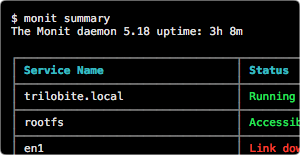 Monit console commands like,
 monit summary and monit procmatch prints UTF8 characters to output data in a nice table. If your terminal is not configured to handle UTF8 text, a stream of strange characters might be displayed instead. Go to preferences for your terminal and select Character Encoding to be unicode/UTF8. On older systems, you can set your terminal's Character Encoding to support UTF8 by selecting a UTF8 locale. For example, in your .profile add this line: export LANG=en_US.UTF-8.
If you absolutely do not want Monit to output data in tables, you can permanently turn this off. Put this statement in your .monitrc file: set terminal batch. You can also use the -B switch to turn off table output once. For example, monit -B summary.